HOW TO DOWNLOAD
HOW TO DOWNLOAD FILES
- I can't find the email with the links
First, check the SPAM and PROMOTIONS folders in your inbox. The email might have ended up there.
The subject of the email with the files is: Files ready to download – Plackowska Planners.
If you still can't find it, there may have been a typo in your email address during the order process, and the planner link didn’t arrive. Please email me at sklep@plackowska.pl, and I will send the link again to the correct address.
- I can't download the files
In the message, you'll find a list of your downloadable products. The names should be highlighted in blue, and you need to click on these file names. See the example below:
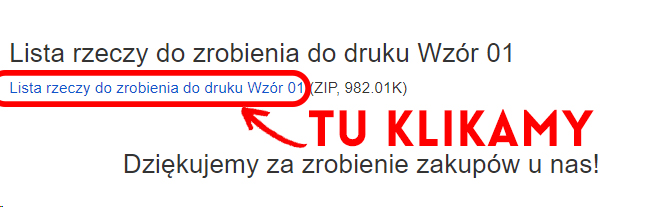
If the names are not highlighted in blue or the download doesn't start, or if you’ve reached the download limit, please contact me by email, and I will send the file again: sklep@plackowska.pl
There is no way someone could pay and not receive their file. :)
- How to extract a ZIP file
Due to the large number of pages and high-resolution file sizes, all files in the store are packaged in a ZIP format. You need to extract them before opening or printing.
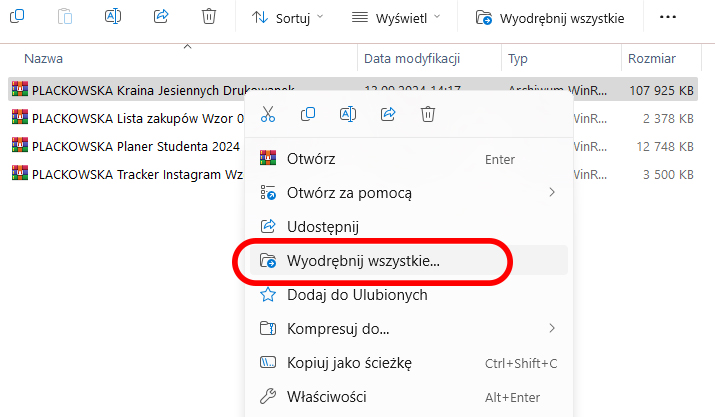
Windows system: Right-click on the ZIP file and look for the "Extract" option, as shown in the attachment below:
iOS system: The file should automatically unzip by double-clicking on it.
Marlena Plackowska
Display prices in:PLN